
Your Library Card, now Fine Free!
Your Mukwonago Community Library card opens doors to thousands of books, movies, music, and more across 24 libraries in Waukesha and Jefferson counties. Whether you prefer physical items or digital downloads, browsing the shelves or picking up holds 24/7, without the added stress of fines!
Logging In
Did you know you can access your library account information through our online catalog? Login to your account to place items on hold, make requests, renew items, and more. This login also gives you access to download and stream books and access online resources.
If you don’t have a library card yet, learn how to register.
Your Password
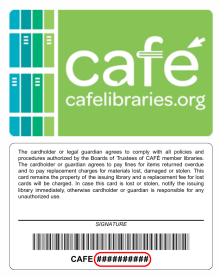
You will need to use your full café number (CAFÉ##########) and password to log in. By default, your password is the last 4 digits of your phone number. If you’re having trouble with your password, please contact the Library.
Checkout Limits
General Materials
The maximum number of items allowed checked out per library card at any given time is 250 items total. You may check out any combination of items up to this maximum, with the following specialty limits:
Specialty Collections
- Video Games: 5 items
- Lucky Day Items: 5 items
- Thingery Items: 5 items
- Explore Passes: 2 items
- Interlibrary Loan: 5 items
For complete details on loan periods and renewals, see Appendix A of our Circulation Policy.
Placing & Picking Up Holds
Place Holds
- In person at the Library
- By phone (requires library card number and address confirmation)
- Online through the CAFÉ Catalog
- Via the Café Libraries App
Hold Limits
- 50 holds for standard library materials
- 5 holds for interlibrary loan items
- Some items cannot be placed on hold, including Lucky Day titles and Thingery items
Picking Up Your Holds
- You have 5 days to pick up items before they're returned to the shelf
- Holds can only be checked out on the card that placed the hold
- You can give your card or app access to someone else to pick up for you
- Choose any CAFÉ library location for pickup when placing your hold
Managing Your Holds
- Pause holds: Request to inactivate holds until you're ready for them
- Reactivate holds: If you miss the pickup window, you can reactivate cancelled holds for up to 60 days (your place in line moves to the bottom of the hold list)
FAQs
What if I don't have my physical card with me?
Download the Café Libraries App to access a digital version of your card that scans at checkout. You can also request that staff hold selected items for you for up to 24 hours (non-holdable materials excluded).
Can my child check out items without me?
Responsibility for the choice and use of library materials by children rests with their legal parent(s)/guardian(s). Therefore, no borrowing restrictions are placed on children once they have obtained their legal parent’s/guardian’s signature on the library application. Parent(s)/legal guardian(s) of minors may check their child’s account at any time by logging into the Café Catalog on a computer or via the app.
Where can I return items?
Return items to any Bridges Library System member library. Some specialty items (like Thingery items and Explore Passes) must be returned to Mukwonago Community Library at the Circulation Desk. Explore Passes may be returned in the bookdrop.
How many times can I renew an item?
Most items can be renewed 3 times for the same loan period, unless another patron has placed a hold on the item. Thingery items cannot be renewed. Interlibrary loan renewals are at the discretion of the lending library.
What happens if my account is blocked?
Accounts are blocked when you have $10.00 or more in fines/fees, or 5 or more overdue items. Return overdue items or pay fees to restore checkout privileges.